
IMPORTANT!!!
Before starting the installation process, please make sure that no other version of Microsoft Office is installed on your device.
If another version of Microsoft Office is already installed, please uninstall it before proceeding with the installation of this product.
Instalation process:
1. Download Office 2021 Professional Plus from: this link
2. After the download is complete, open the installation file.
3. Once the installation has finished, click the “Close” button.
4. Open Microsoft Word, then enter or paste your product key and click “Activate Office”.
5. Installation and activation have been completed successfully.
If the license was not activated automatically, follow the steps below to complete the activation of Office 2021 Professional Plus.
Alternative Activation Method (Telephone Activation)
Please try the second activation method by following the steps below:
1. Select the second activation method, the telephone activation option.
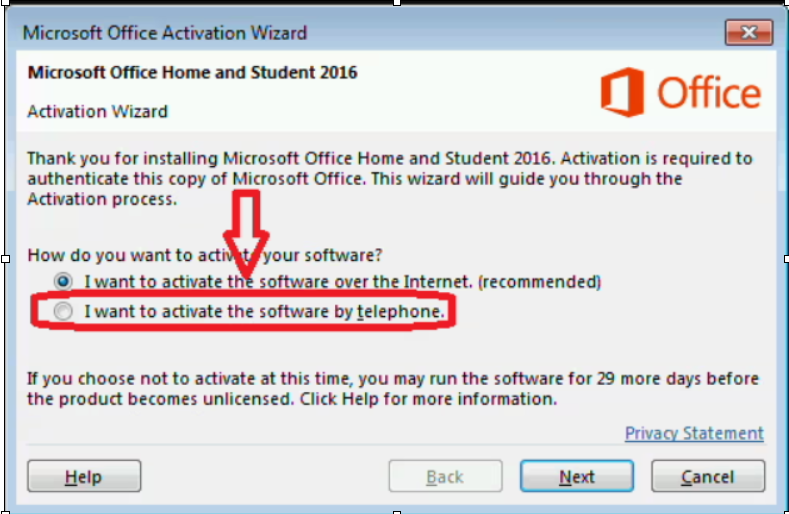
2. Enter the 63-digit code, or alternatively you can take a screenshot showing the code.

3.Go to https://onlinekeys.eu/activation
4. Copy that code into the “Installation ID Input” field, then click the “Get Confirmation ID” button.

5. Copy the generated confirmation code displayed at the bottom and enter it into the Step 3 boxes in Microsoft Office, then click “Next”.

Activation is complete.

